
Instagram is rolling out a fresh set of updates that feel particularly relevant for Indian creators who have been wanting better ways to reach people in their own languages. At the House of Instagram event in Mumbai, the Meta-owned platform announced that its AI translation and dubbing tools are expanding to five major regional Indian languages. It also introduced local script support in the editing suite, which perhaps sounds small at first but can genuinely change how creators stylize their content. Together, these updates aim to help viewers consume content more comfortably while giving creators a chance to break through language barriers that often limit their reach.
Key Takeaways
- Meta AI will soon dub Reels into Bengali, Tamil, Telugu, Kannada, and Marathi.
- The translation tool uses lip-sync technology to match mouth movements with the newly generated audio.
- Creators now get new fonts for Hindi, Marathi, Bengali, and Assamese scripts.
- The updated fonts will roll out to Android users over the coming days.
Meta AI Translations for Regional Languages
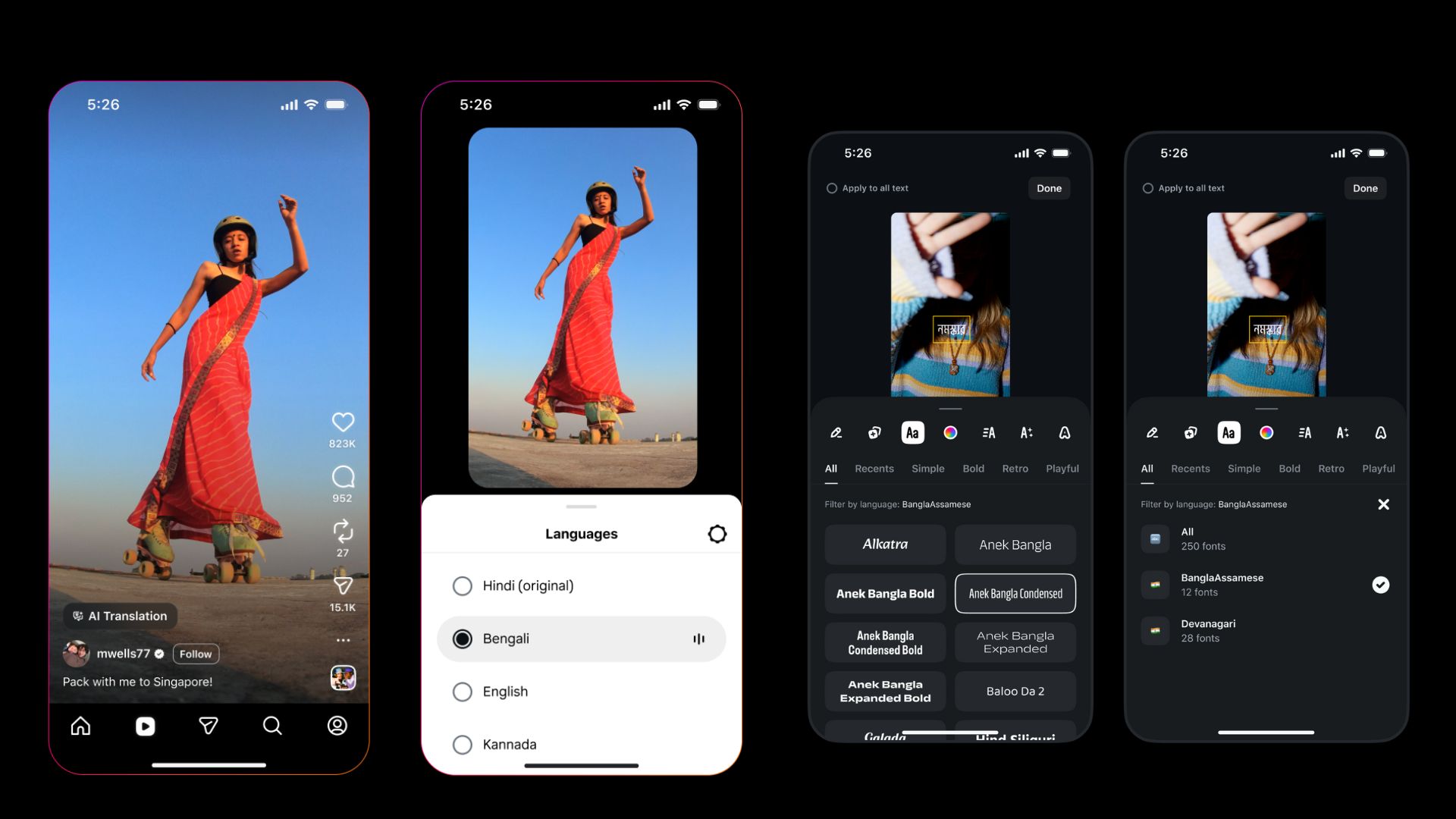
The biggest highlight here is Instagram’s push into deeper multilingual support using Meta AI. Creators will soon be able to automatically dub their Reels into Bengali, Tamil, Telugu, Kannada, and Marathi. This builds on the earlier rollout in October, which only included English, Hindi, Spanish, and Portuguese.
What makes this update more interesting is that it is not just a simple voice-over. The technology tries to recreate the creator’s original tone and pitch in the new language. So the translated version still sounds like you, which feels a bit surreal but in a good way. Another important part of this feature is the automatic lip-syncing. When it is turned on, the AI adjusts the speaker’s lip movements to match the translated speech. The result is a video that looks surprisingly close to someone actually speaking in the target language.
For a country as linguistically diverse as India, this could solve a long-standing distribution issue. A creator sitting in Tamil Nadu might soon reach an audience in Maharashtra without having to re-record anything. And honestly, that convenience alone will likely encourage more creators to experiment with multilingual content.
New Fonts for Indian Scripts
Instagram also added new visual tools for people who like to customize their text overlays. The platform now supports Devanagari and Bengali-Assamese scripts directly within the Edits tool. This means creators can design their captions or on-screen text in Hindi, Marathi, Bengali, and Assamese using fonts that actually look intentional rather than generic or slightly mismatched.
These new fonts will appear on Android devices over the next few days. To try them out, you simply tap the “Aa” icon in the editor. If your phone’s language settings already match one of the supported languages, the fonts will show up automatically. Otherwise, you can scroll down in the all fonts section and filter by language.
Why This Matters for Creators
All of this arrives as Meta continues adjusting its strategy to keep up with the short-form video space, especially with YouTube Shorts gaining traction. In recent weeks, the company added tools like bulk caption editing and new sound effects. By investing specifically in regional languages, Instagram is acknowledging that India’s next wave of internet growth comes largely from non-English-speaking audiences.
The update also reduces how much manual effort goes into localizing content. Instead of recording multiple versions of the same video, a creator can record once and rely on AI to deliver it to several linguistic regions. It is not hard to imagine how big this might be for creators who are trying to scale without spending all day in front of the camera.
Frequently Asked Questions
Q1: Which new languages does the Instagram AI translation tool support?
A1: The tool now supports translation for Bengali, Tamil, Telugu, Kannada, and Marathi. This is in addition to the previously launched support for Hindi.
Q2: Does the AI change the sound of my voice in the dubbed video?
A2: No, the tool aims to preserve your original voice tone and pitch. It effectively clones your voice to speak the new language.
Q3: How do I access the new Indian fonts on Instagram?
A3: Open the Text tool in the Reels or Stories editor. If your device language is set to an Indian language, the fonts will appear automatically. If not, check the all fonts tab.
Q4: Is the lip-sync feature available for all videos?
A4: The lip-sync feature is part of the AI translation tool. You can choose to enable or disable it when you apply the translation to your Reel.